Complete Guide to Claude Cowork Artifacts
When Claude creates a file in Cowork, something magical happens: certain file types don't just get saved—they get rendered directly in the interface. These are called artifacts, and understanding them unlocks powerful capabilities while also avoiding frustrating limitations.
This guide covers everything you need to know about Cowork artifacts: what's supported, what's restricted, and how to get the best results.
Table of Contents
- What Are Artifacts?
- Supported File Types
- React Components in Artifacts
- Critical Restrictions
- Available Libraries
- Best Practices
- Common Issues and Solutions
What Are Artifacts?
Artifacts are files that Claude creates which are rendered interactively in the Cowork interface rather than just displayed as raw code or text.
Why Artifacts Matter
Instead of:
Here's your React component code:
[code block that you need to copy and run elsewhere]
You get:
Here's your interactive component:
[actually renders and works in the interface]
This immediacy is powerful—you can see results, interact with them, and iterate quickly without leaving the Cowork environment.
Files vs. Artifacts
| Regular File | Artifact |
|---|---|
| Saved to disk | Saved AND rendered |
| Viewed as raw content | Interactive display |
| Requires external tools | Works in Cowork UI |
| Any file type | Specific supported types only |
Supported File Types
Cowork supports six artifact types that render directly in the interface:
1. Markdown (.md)
Use for: Documentation, notes, reports, formatted text
Features:
- Full Markdown syntax support
- Headers, lists, code blocks, tables
- Links and images
- GitHub Flavored Markdown
Example request:
"Create a project documentation file with installation instructions"
2. HTML (.html)
Use for: Web pages, styled content, complex layouts
Features:
- Full HTML5 support
- Inline CSS styling
- Interactive elements (buttons, forms)
- Rendered in sandbox
Example request:
"Create an HTML landing page mockup for our new product"
3. React/JSX (.jsx)
Use for: Interactive components, data visualizations, apps
Features:
- React 18 components
- Hooks (useState, useEffect, etc.)
- Event handling
- Component composition
Example request:
"Create an interactive dashboard component with charts"
4. Mermaid (.mermaid)
Use for: Diagrams, flowcharts, architecture diagrams
Features:
- Flowcharts
- Sequence diagrams
- Class diagrams
- State diagrams
- Entity relationship diagrams
Example request:
"Create a flowchart showing our user registration process"
5. SVG (.svg)
Use for: Vector graphics, icons, logos, illustrations
Features:
- Scalable graphics
- Animation support
- Interactive elements
- Embedded in HTML/JSX
Example request:
"Create an SVG logo for my company"
6. PDF (.pdf)
Use for: Documents, reports, formatted output
Features:
- PDF rendering in interface
- Multi-page documents
- Professional formatting
Example request:
"Create a PDF report from this data"
React Components in Artifacts
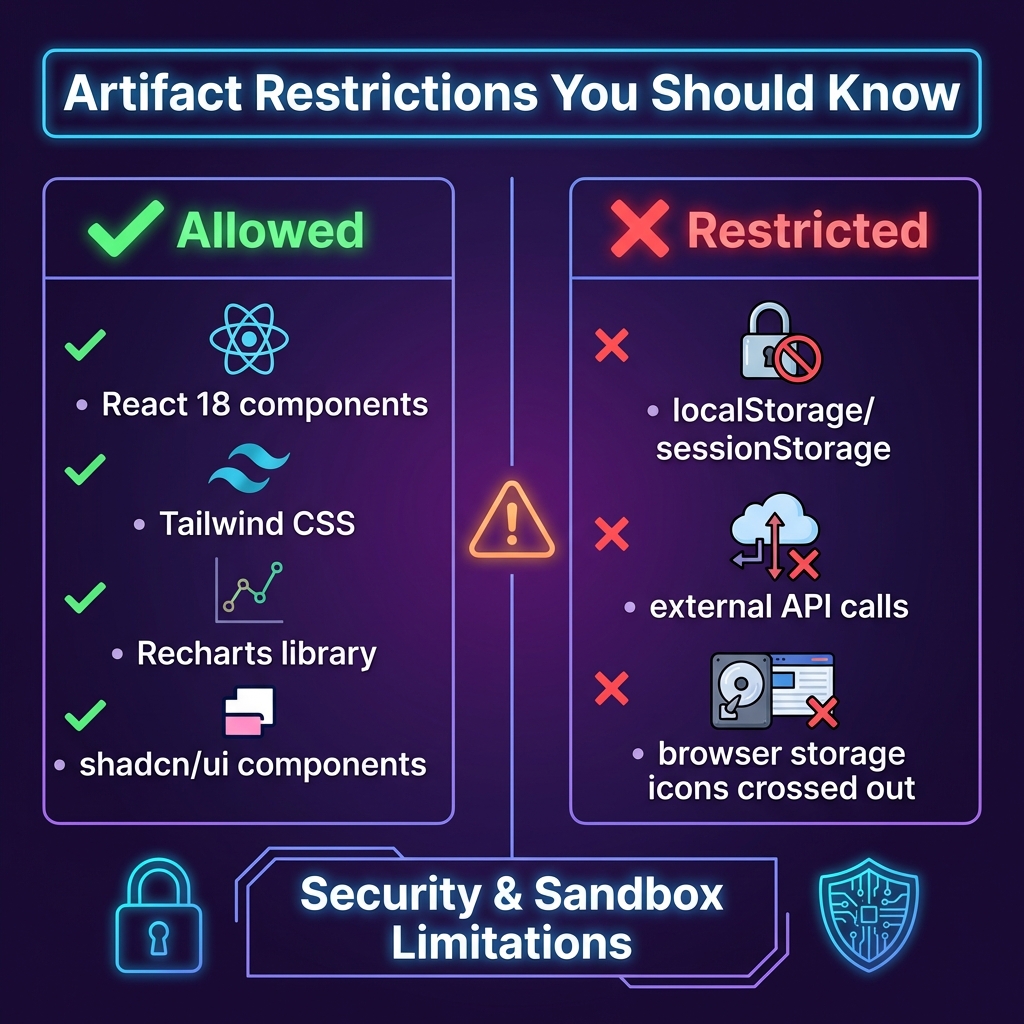
React artifacts are the most powerful—but also the most restricted. Here's what you need to know:
How React Artifacts Work
When you create a .jsx file, Cowork:
- Renders it using React 18
- Runs it in a sandboxed environment
- Displays the result interactively
Component Requirements
| Requirement | Details |
|---|---|
| Export default | Component must be exported as default |
| Single file | All code must be in one file |
| Self-contained | Cannot import local files |
| Hooks supported | useState, useEffect, useRef, etc. |
Example React Artifact
// A valid React artifact

export default function InteractiveCounter() {
  const [count, setCount] = React.useState(0);

  return (
    <div className="p-4 bg-gray-100 rounded-lg">
      <h2 className="text-xl font-bold">Counter: {count}</h2>
      <button
        onClick={() => setCount(count + 1)}
        className="px-4 py-2 bg-blue-500 text-white rounded"
      >
        Increment
      </button>
    </div>
  );
}
Critical Restrictions
This is crucial information directly from Claude's system prompt. These restrictions exist for security and sandboxing purposes.
❌ No Browser Storage APIs
Critical Warning: Artifacts cannot use localStorage or sessionStorage.
"When writing artifacts, Claude must not use browser storage APIs like localStorage or sessionStorage."
This means:
- No persisting data between sessions
- No storing user preferences
- No caching in browser storage
- State resets on each render
Workaround: Use component state (useState) for temporary data, or request Claude to save data to files instead.
❌ No External API Calls
Artifacts run in a sandbox and cannot:
- Fetch data from external APIs
- Make HTTP requests
- Connect to databases directly
- Access external services
Workaround: Have Claude fetch data first, then pass it as props or hardcode it into the component.
❌ No Local File Imports
Artifacts must be self-contained. You cannot:
- Import from other local files
- Use relative imports
- Split code across files
Workaround: Put all code in a single file, or ask Claude to combine components.
❌ Limited External Libraries
Only pre-approved libraries are available. You cannot:
- Install npm packages
- Use arbitrary libraries
- Import unavailable modules
Solution: Use only the available libraries (listed below).
Available Libraries
These libraries are pre-loaded and available in React artifacts:
Core Libraries
| Library | Version | Use For |
|---|---|---|
| React | 18.x | Component framework |
| Tailwind CSS | 3.x | Styling |
| Recharts | 2.x | Charts and graphs |
| shadcn/ui | Latest | UI components |
| Lucide React | Latest | Icons |
Using Recharts for Visualizations
Recharts is particularly powerful for creating interactive charts:
import { LineChart, Line, XAxis, YAxis, CartesianGrid, Tooltip } from 'recharts';

export default function SalesChart() {
  const data = [
    { month: 'Jan', sales: 4000 },
    { month: 'Feb', sales: 3000 },
    { month: 'Mar', sales: 5000 },
  ];

  return (
    <LineChart width={600} height={300} data={data}>
      <CartesianGrid strokeDasharray="3 3" />
      <XAxis dataKey="month" />
      <YAxis />
      <Tooltip />
      <Line type="monotone" dataKey="sales" stroke="#8884d8" />
    </LineChart>
  );
}
Using shadcn/ui Components
shadcn/ui provides pre-built, accessible components:
import { Button } from '@/components/ui/button';
import { Card, CardHeader, CardTitle, CardContent } from '@/components/ui/card';

export default function Dashboard() {
  return (
    <Card>
      <CardHeader>
        <CardTitle>Welcome</CardTitle>
      </CardHeader>
      <CardContent>
        <Button variant="default">Get Started</Button>
      </CardContent>
    </Card>
  );
}
Best Practices
1. Choose the Right Artifact Type
| Need | Best Artifact Type |
|---|---|
| Text documentation | Markdown (.md) |
| Static web page | HTML (.html) |
| Interactive component | React JSX (.jsx) |
| Flowchart/diagram | Mermaid (.mermaid) |
| Vector graphic | SVG (.svg) |
| Printable document | PDF (.pdf) |
2. Keep React Artifacts Simple
- Focus on one concern per artifact
- Avoid overly complex state management
- Use Tailwind for styling (no CSS files)
- Test interactions mentally before requesting
3. Work Around Storage Limitations
Instead of:
"Create a to-do app that saves tasks"
Request:
"Create a to-do app. Save the task list to a JSON file when I click 'Save'"
4. Specify Library Usage
If you want charts or specific UI components:
"Create a dashboard using Recharts for the graphs and shadcn/ui for the layout"
5. Request Mermaid for Diagrams
For any process flow or architecture:
"Create a Mermaid flowchart showing the user signup process"
Common Issues and Solutions
Issue: "localStorage is not available"
Cause: Attempting to use browser storage Solution: Use React state or request file-based storage
Issue: Component doesn't render
Cause: Missing default export or syntax error
Solution: Ensure export default function ComponentName() pattern
Issue: External data not loading
Cause: Cannot fetch from external APIs Solution: Have Claude include data directly in the component
Issue: Styling not applying
Cause: Using CSS files or non-Tailwind classes Solution: Use Tailwind utility classes inline
Issue: Library not found
Cause: Attempting to use unavailable library Solution: Use only React, Tailwind, Recharts, shadcn/ui, or Lucide
Key Takeaways
- Six artifact types render in Cowork: md, html, jsx, mermaid, svg, pdf
- React artifacts are powerful but have strict limitations
- No browser storage (localStorage/sessionStorage) is available
- Use available libraries: React, Tailwind, Recharts, shadcn/ui
- Keep artifacts self-contained: Single file, no local imports
- Choose the right type based on your actual need
Understanding artifacts transforms what you can accomplish in Cowork. By knowing both the capabilities and limitations, you can request exactly what's possible and avoid frustrating dead ends.
Related Guides
- Mastering Skills System - Document creation
- Parallel Task Processing - Task Tool guide
- Optimizing Workflows - TodoList and AskUserQuestion
- What is Claude Cowork? - Complete introduction
Last updated: January 14, 2026
This article is part of CoworkHow.com, an independent resource for Claude Cowork users. We are not affiliated with Anthropic.